Today I will introduce you to the Python tool PyInstaller and
present my application created with it. PyInstaller is used to turn
Python files, such as .py files, into application
files like .exe on Windows, Linux binary files on
Linux and ChromeOS, and UNIX executable files on Mac.
Why make Python files into applications?
- Applications can be run just by clicking on them.
- They can run on computers without Python installed.
- Your code cannot be easily viewed or edited by users.
- GUI applications can run without opening too many windows.
Installing PyInstaller
First, install PyInstaller like a Python module or library.
- Go to Terminal, Command Prompt, or PowerShell.
-
On macOS or Linux, type
pip3 install pyinstaller. On Windows, typepip install pyinstaller. If the terminal does not recognize the command, use the separate pip troubleshooting guide.
Turning a Python file into an app
Next, you need a Python file. Just write a simple program with very few lines. If you want the output to stay open, because it usually closes as soon as the program is over, type this as the last line:
input("Press Enter/Return to close")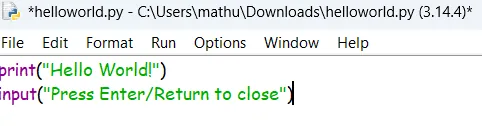
Save the file in Downloads. Open a new terminal, then move into Downloads:
cd Downloads
Then run PyInstaller with --onefile and your filename:
pyinstaller --onefile yourfilename.py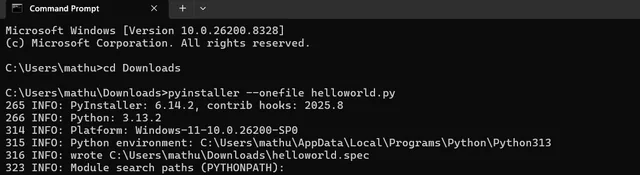
After the processing is done, usually within about 15 seconds, it
will give you the location of your .exe file. If your
antivirus deletes your file, which can happen because unsigned
executable files look suspicious, use --onedir instead
of --onefile and run your application from the folder.
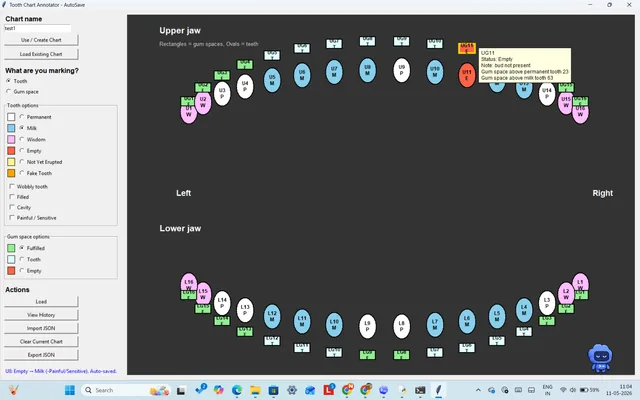
My Teeth Chart App
In mid-2026, I had to get a milk tooth pulled out due to a bud problem. During the dentist visit, I wondered how to solve a problem that popped up now and then. My family and I could not always remember which of our teeth were deciduous, permanent, or wisdom teeth. So I had an idea: I would make an app for marking teeth virtually.
With around 15 to 20 prompts with ChatGPT, I got my desired code with full features:
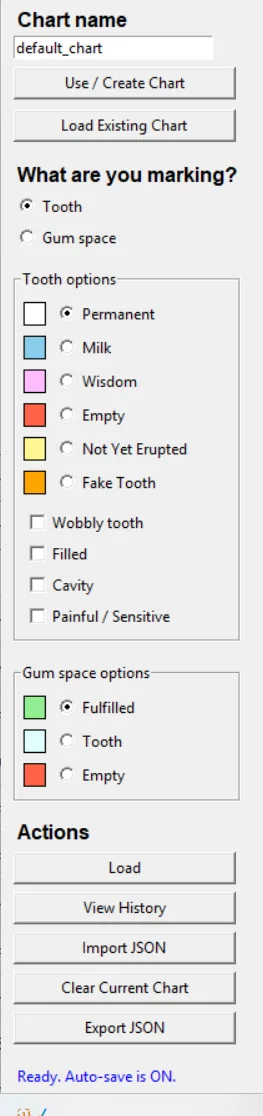
- Marking teeth with options: Permanent, Milk, Wisdom, Not Yet Erupted, Fake, and Empty.
- Labelling teeth as Wobbly, Filled, Cavity, or Painful/Sensitive.
- Marking gum spaces as Fulfilled, Tooth, and Empty.
- Importing and exporting charts so other people can view them.
- Adding notes for all of your teeth.
- Seeing the history of your teeth.
- Having multiple charts stored locally with high simplicity.
Download the app
You can download the app for MacOS, Windows, Linux, or a ChromeOS laptop—or download the Python file and check the code if you are suspicious.
 Linux AppImage / DEB
Python Source Script
ChromeOS Desktop .apk
Linux AppImage / DEB
Python Source Script
ChromeOS Desktop .apk
On Mac, you may need to allow the unsigned executable in Privacy & Security. Contact me if you want a version of the app in a different format, such as tablets and phones. Tablet and phone versions are not recommended because of their small screens and lack of developer tools.
Install with Homebrew
If you do not have Homebrew already, install it first:
/bin/bash -c "$(curl -fsSL https://raw.githubusercontent.com/Homebrew/install/HEAD/install.sh)"Then install Teeth Chart App:
brew tap nithilanvivek/teethchartapp
brew trust nithilanvivek/teethchartapp
brew install --cask teethchartapp
Third-party notices
Python is licensed under the Python Software Foundation License. Copyright (c) Python Software Foundation and contributors. See LICENSE or THIRD_PARTY_NOTICES for details.
When you turn this into an .exe with PyInstaller, the
command line will be slightly different:
pyinstaller --windowed --onedir TeethChartApp.py
We use --windowed to show that this is a GUI, or
graphical user interface, application and that a terminal window
should not be opened every time you run it.